
Today, main aapko btauga ki kaise aap apne WordPress blog me post title ke bad AdSense ads show kar sakte ho, I mean how to add google AdSense ad below post title without using any plugin. Aap is post me btayi trick se bina plugin ke WordPress blog me post title ke niche ads laga sakte ho.

Google AdSense first ads network hai, bahut sare blogger AdSense par apne blog monetize karte hai kyuki ye ye baki ads network company ki tulna me better pay karta hai.
Adsense advertisement se good earning karne ke liye site par ads ka sahi se placement karna jaruri hota hai. Mostly, blog post title ke niche AdSense ads lagane se CPC, CTR increase hoti hai or ad par clicks bhi jyada milte hai.
Mian AdSense ko optimize karne ke bare me already Google Adsense Ads Ko Optimize Karne Ki Top 15 Effective Tips articles me details se bta chuka hu. Is post me aapko AdSense placement ke bare me better tips milegi jinse aap apni AdSense revenue increase kar sakte ho.
How to Display Adsense Ads After Post Title In WordPress Blog in Hindi
Now, hum bat karenge ki WordPress blog me post title ke bad AdSense ke ads kaise display kare. Wese aap ad injection jaise plugin use karke direct post title ke bad ads show kar sakte ho but yaha hum without plugin ads lagane ke bare me bat kar rahe hai.
Add Adsense Ads Below Post Title Without Using Any Plugin: Iske liye aapko jyada kuch nahi karna hai bas ye 2 step follow karne hai.
Step 1:
- Apne WordPress blog ke dashboard par jaye or appearance >> editor par click kare.
- Ab theme function yani functions.php folder open kare.
- Folder open karne ke bad usme sabse niche ye code paste kare.
- Code paste karne ke bad settings save kare.
//* Show ads below post title by https://www.supportmeindia.com
genesis_register_sidebar( array(
 'id' => 'ad-after-title',
 'name' => __( 'Ads After Title', 'custom' ),
 'description' => __( 'This is Ad section under post title', 'custom' ),
) );
add_action( 'genesis_entry_header', 'basicwp_post_ad_feature', 12 );
function basicwp_post_ad_feature() {
 if ( is_single() && is_active_sidebar( 'ad-after-title' ) ) {
 echo '<div class="ad-after-title">';
 dynamic_sidebar( 'ad-after-title' );
 echo '</div>';
 }
}
Step 2:
- Ab aap fir se WordPress dashboard par jaye or appearance >> widgets par click kare.
- Ab yaha par aapko Ads after title name ki widget milegi.
- Isme aap text widget select karke AdSense ad code paste kar sakte hai.
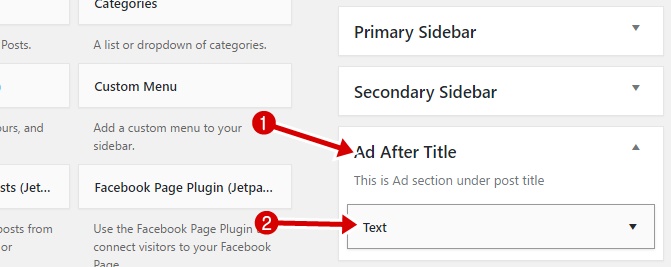
Is tarah se aap WordPress blog me post title ke bad easily adsens ads ya other kisi bhi advertising ko add kar sakte hai.
Post Title Ke Bad Ads Kyu Add Kare ?
Agar aap soc hrahe hai ki ads ko post title ke bad hi kyu add kare or ye kyu jaruri hai to main aapk obta du ki post topic ke bad yani post content se pahle AdSense ads lagane se click through rate yani AdSense CTR increae hoti hai.
- Google Adsense Kis Tarah Ke Content Par Ad Allow Nahi Karta
- Google Adsense Ad Se Kitni Traffic Par Kitne Paise Kama Sakte Hai
Sath hhi ye ads lagane ka better place hai or yaha par aapko jyada clicks or jyada CPC milti hai. Because better CTR hone par google high CPC ads show karta hai.
I hope this tutorial helped you in placing AdSense ads after post title on your wodpress blog. Agar ha to humari AdSense wali dusri post bhi jarur padhe or is post ko social media par share jarur kare.







ye code error aa raha hai. code ki 2 no line error dikha raha hai.
Your PHP code changes were rolled back due to an error on line 91 of file wp-content/themes/customizr/functions.php. Please fix and try saving again.
Call to undefined function genesis_register_sidebar()
Ye code genesis child theme ke liye hai.
Hello Sir, Recently i was following your steps to make ads on below post but there is a problem when i paste the code in function.php, then fetal error is showing please help me sir.
My dashboard can’t be open i tried many times.
No worry aap cpanel me ja kar file manager >> wp-content >> themes >> your theme >>functions.php file open karke jo code aapne add kiya hai wo remove kar do.
नमस्कार सर..!!
…..मैंने अपना Blog/Site Template बदला है….Site Speed फ़ास्ट हो गई है |..(Please check)
…..आपके बताये अनुसार मैंने Post के अंदर (Up & down) में Link Unit Ads लगाया है |
Questions:
1) क्या 01 Content Unit + 01 Link Unit Ads दोनों एक साथ (ek-k-baad-ek) लगा सकते है ??
2) मैंने आपके सभी Content Post में लगे ads देखे है… जो Full width/length (चौड़े) में Show होता है..
……ये कैसे लगते (साइज) है ? …. क्या ये Adsense Recommended Ads साइज है ?
……इसे लगा Mobile friendly कैसे बनाये ?
……Sir; Please give me ‘Default Responsive Ads CODE’..[Site+mobile]
1. Nahi.
2. ye responsive size hai. Yes recommended.
Look here Responsive Ad Units Se AdSense Earning Increase Kaise Kare
Thanks Bhai
1 . kya koi aisa trick nahi hai kya jisse ham ye jaan sake ki hamari kon kon si post search me aa rahi hai.
2 . min Google me blog ka name dalkar show hone wali sabhi post ka pata lag jaye.
Yes hai Search Engines Me Aapki Website Ke Kitni Post Index Hai
Thanks bhai
Aapne meri bahoo help ki hai thank you gi
1 . Aapke anusar yadi me question se related post likhu or visitor answer de to ham us post me adsean ads kaha use kare.
2 . Chitika ,bigadversting auto click ads hai to kya inse hame adsean ke mukable zyada incom hogi quki ye automatic vistor ko ads par le jate hai
1. Yes
2. Nahi, isse user experience bhi kharab hoga.
Thanks bhai
1 . Kya ham aisi website blog nahi bana sakte jisme ham question kar ke chod de or user apne hisab se comment ke dwara replay de sakhe.
2 . Agar ham aisi website blog banaye to adsean approved ho jayega kya quki maine suna hai ki page me content nahi hone se adsean ushe approved nahi hota hai
3 . Maine doveloper se baat ki vo bole ki jab tak adsean ke ad blocker ki coading file nahi milti to ham ad blocker on hone par ads show nahi kar sakte.
4. Lekin dusra doveloper bol raha hai ki ho jayega. Aapko kya lagta hai
5 . Google me search karne par website ka page 1 nuber pe to aata hai,lekin meri site domen service provider se SEO me verified hai,kya mujhe meta tag se verified karna hoga,
1. Yes bana sakte ho. WordPress iske liye best option hai.
2. Yes ho jayega.
3. Ad blocker ko disable kiye bina ad show nahi kar sakte. Wese ye namumkin nahi hai. Coding expert aesa kar sakte hai.
4. Yes try kare to sab possible hai.
5. Meta tag best or easy method hai.
Sir, Mere Google AdSense par Data of birth 17-11-1998 hy or Bank account m 17-11-1999 hy…..
Payment ke time koi problem t nahi hoga… plz help me
Aap adsense me date of birth change kar sakte ho.
Sir kya health related blog profitable rahega ya nahi . ya kaun sa profitable niche hai jispe blog banau.
Health is best choice.
wordpress me dono side me adsense ads kaise lagaun meri site http://www.hindi-samachar.com he aur me http://www.jansatta.com ke jaise dono side me adsense ads dikhana chahta hun but meri samajh me nahi aa raha he ki me adsense code kaise add karu aap mujhe bataye me konse page me code add karna he.
Aap humari adsense wali posts check kare sab samajh aa jayega.
nice and important article bro. but at this time many plugin allow us to place ad in desired place of page, post
Hello sir, please help mene ye aapke diye huye code function.PHP me paste kiye to mera website hi band ho gya errors aa raha hai plz bataiye kya kru ab ye error hai “currently unable to handle this request HTTPS 500 Error”
1. Aap cpanel par jao or public_html >> wp-content >> theme par jao.
2. Ab aapne jis theme ke function.php folder me code paste kiya hai us theme par click karo.
3. Ab function.php folder par right click kar edit par click karo or apane jo code paste kiya hai use remove kar save apr click karo.
Blog live ho jayega.
Sir aapke sabhi post bahut useful hai.
1. Sir me Genesis theme use kar raha par usme header me logo ke samne ad kaise lagate hai please help me.
2. Menu me CSE kaise add kare
header widget me add code add karo.
iske bare me google me search karo post mil jayegi.
tell me JKD
plz bta do
kya me go daddy se web bna kr wha song upload kr skta hu kya and wha esi link ad kr skta hu kya ko direct YouTube pe open ho
Nahi song ke liye aap wapka par site banao.
Bro…
Ye sirf Genesis Theme me hi work karta hai..
I research for it…
Sir aapki tarah bhi mera middle name bhi hai AdSense me first and last name hota hai to me apne middle name ko first name me space deke likhu ya jod ke likhu sir please help me
jaisa aapka name hai wesa likho jaise Jume deen kha nahi to first name me Jume deen likho.
Jumedeen bro website ke post 1st page pe lane k liye, On page& offpage SEO ke alawa hume codings sikh ne ki jarurat padti hai ? .. jaise htlm,php wgra. mai sirf H1 ,H2,H3,H4 tags ki baat nhi kr rha kya aur bhi use hai in codings ka jise jane bina 1st page pe aana mushkil hai.
aur shukriya bhai app sahi mayne me madat krte ho
bro mai screen short kaise dikhao apko image kaise upload karu apko
alok direct mail id par send karo.
sir feature image ko post ke middle me kaise set kare
Aap post me image ko kahi bhi set karo uske bad aap kisi bhi image ko feature image choose kar sakte ho.
AssalamoAlaikoom,
Jumedeen Khan Bhai Ek Sawal Hai
BLOGGER Post me boder banane ka code Jaese
Hai,
Agar Image ko boder banana ho to kaese karenge/uska HTML Code kaesa hoga?
Question Hai- How to Add image bodder Around POst on blogger blog
Mera mtlab Hai Post Ke Charo Taraf Image ka Boder Ho Reapeat krke
please iska idea hamein bataiye ho sake to code ya koi post aapne likha ho iske bare me to uska link mujhe send kijiye
w/a
apne blog ko open karo or image par right click kar inspect par click karo yaha class=”” me jo code ho wo aapki image ka html code hai.
bro mre AdSense ke home page par ads ka code show hota hai kya mai usse apne website par copy paste kar ke laga sakta hu isse koi problam to nahi aati hai kyu ki AdSense third party ads ko nahi manta hai
alok AdSense ke homepage par koi bhi ads code show nahi nahota hai. Aap mujhe screenshot dikhao.
Sir,mythemeshop par credit or debit card dono se payment hota he or mere pass IDBI BANK and BANK OF BARODA do bank ke Debit card he jinme IDBI ke debit card par valid only in india or BANK OF BARODA vale par International Debit card aisa likha huaa he to kya BOB vale se payment ho jayegi
Nahi hogi aapko credit card se payment karna hoga. Check karo mythemshop par only us and uk ke debit card se payment kar sakte hai india me credit card se hi karna hoga.
Apne ne bahut acha bataye hai is post me.
Very nice post .bhai aapne 3 website banayi hai to kya aapki income tino website se hoti hai?
yes
Sir,Muje Mythmeshop se theme buy krni he uske liye maine mere friend ke Bank of Baroda ke Credit Card se try ki lekin vhaa “Your card declined” massage show ho rhaa he aisa kyu? please help me
Your card declined means aapka card अस्वीकार kar diya hota hai. iska koi reason bhi btaya hoga. aap fir se try karo fir bhi issue ho to mythemeshop ke support forum me iske bare me bat karo aapko sahi help mil jayegi.
nyc information bro keep it up. 🙂
Jume deen ji, nice article. Can you please suggest after how many pages view daily one should think to switch from blogger to WordPress.
बबिता जी ब्लागस्पाट से वर्डप्रेस पर शिफ्ट होने की वजह ट्रैफिक नहीं होता है वर्डप्रेस ब्लॉगर से ज्यादा बेहतर है और आपको सबकुछ करने की इजाजत देता हैं इसीलिए लोग इसे पसंद करते हैं अगर आपको लगता है की आप वर्डप्रेस पर ब्लॉगर से बेहतर कर सकती हो तो आपको मूव कर लेना चाहिए.
Aap jaise aapne post ke under AdSense ads ko use karte ho usi traha blogger blog par kaise add kare… ?
haa kar sakte ho iske bare me mai already post kar chuka hu.
Sir
Mere YouTube Channel pe 12 doller se jadya ho gaye hai aur maine adsens se connect bhi kiya hai ab muje google verification code kab milega
jab aapke AdSense account me $10 ho jayegne to AdSense aapko address verify karne ke liye bolega tab aap apna address check karke post send kar sakte hai.
जुमेदीन सर मैं यह जानना चाहता हूँ की पोस्ट के निचे बिना किसी प्लगिन की मदद से कोई कोड कैसे लगाये? इसके बारे में भी कोई पोस्ट लिखिए… खास करके तब जब मैं किसी रिलेटेड प्लगइन की नीचे विज्ञापन दिखाना चाहता हूँ.. धन्यवाद…
wait main iske bare me bhi jald hi post likhunga.
aap author box ke liye konse plugins ka use karte ho..
ye feature already mere blog ki theme me hai.
thanks for sharing this information ….. 🙂
sir mai aap se ye puchna chahta hu ke aapke pass bloging ki jankari milti kaise hai jaldi anser de
nternet se.