
Google search results में हिंदी page के URL के सामने “translate this page” का translation option show होता हैं user के इस पर click करने से आपकी site का page google translate tool में open होता है जिसका आपकी site को कोई benefit नहीं होता। ये न तो आपकी site की traffic में count होता है और न ही इसमें आपके advertisement like google adsense ads show होते हैं। अगर आप इस feature को google से hide / remove कर दो तो user आपके site pages के link पर ही click करना पड़ेगा। तो चलिए अब जानते है की google search से translation feature को remove कैसे करे?
सिर्फ इतना ही नहीं जब कोई user आपकी को site chrome browser में open करता है तो chrome browser user को automatic hindi to english translation करने के लिए कहता है जिससे आपके audience को problem होती है। हालाँकि user इस option को chrome settings में जा कर off कर सकते है मगर आप अपनी site पर इस automatically translation को बंद कर अपने readers की इस परेशानी दुर कर सकते हों ताकि visitor को बार बार इस feature को disable न करना पड़े।
मगर सबसे बड़ी problem google search engine की है जिसे solve करना जरुरी हैं। अगर आपकी site english language में है और आपके page में थोड़े से words हिंदी या किसी और local language में है तो भी google search में आपके page के सामने [Translate this page] का option show होगा।
- Blog में Google Translation Widget Add कैसे करें
- WordPress Blog में Google Translation Tool Add कैसे करें
अब अगर आप चाहते है की आपकी site pages के सामने google search result में translate this page का option show न हो तो आप ये guideline follow कर सकते हैं। Website webpages से google translation feature को disable कैसे करे?
Google Search Results से Translate this Page Feature को Hide कैसे करे?
सबसे पहले मैं आपको translate this page का example बता देता हु ताकि आपको clear और आसानी से समझ आ सके। आपके translation feature को disable करने के बाद आपकी site के सभी pages के सामने google search results में “translate this page” का option show नहीं होगा इस तरह से,
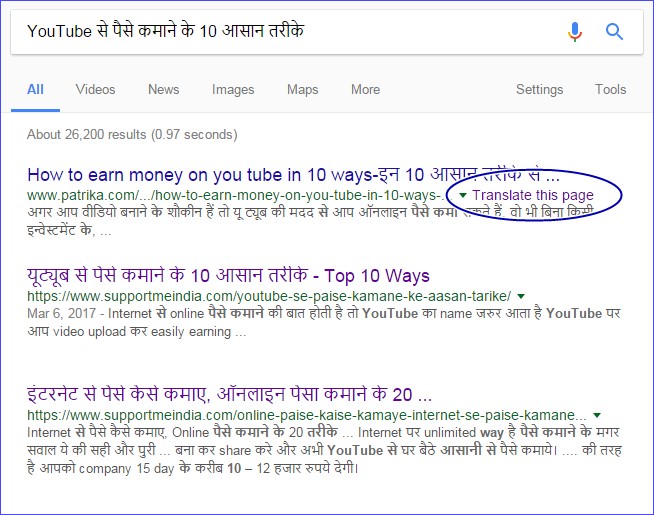
यहाँ पर आप clear देख सकते है की SupportMeIndia के दोनों articles के full hindi में होने के बावजूद उनके सामने translate this page का option show नहीं हो रहा है मगर दूसरी पोस्ट पर ये feature show हो रहा हैं। अब मैं आपको बताता हु की मैंने ये कैसे किया और इसके लिए आपको क्या करना पड़ेगा।
Google में Show होने वाले Translation Feature को Disable करने का आसान तरीका:
Site पर से google translation feature को remove करने के लिए आपके पास कई तरीके हैं जिनमे से मैं आपको सबसे best और workable तरीका बता रहा हूँ meta tag का आप blog में translation disable metadata add कर translate this page feature को off कर सकते हों।
मैं इसके लिए ये meta tag code use करता हूँ इसे आपको blog में <head> and </head> section के between add करना हैं।
<meta name="google" content="notranslate">
इस metadata code को आप WordPress, BlogSpot blogger and other all websites and blog webpages पर इस्तेमाल कर सकते है ये सभी site pages के लिए work करेगा।
इसके अलावा आप direct chrome browser से भी google translation को off कर सकते हो उसके लिए आप ये steps follow करें।
How to disable Google Translation Feature on Chrome Browser:
- Google chrome browser open करे।
- अब window में top right corner पर three point chrome menu icon पर click करें।
- Settings select करें।
- अब Show advanced settings पर click करें।
- अब Language section में “Offer to translate pages that aren’t in a language you read.” option को uncheck करें।
इन steps को follow कर आप mobile, desktop computer, laptop, tablet किसी device के भी chrome browser की language translate feature को disable कर सकते हों।
इस तरह से आप अपनी site पर से “translate this page” और google translation को disable कर सकते हो और अपनी website को पहले से ज्यादा user friendly बना सकते हों।
अगर आपको इस बारे में कोई सवाल पूछना हो या आपके पास इस feature को disable करने की कोई और method हो तो हमे comment में बता कर हमारी और हमारे readers की help कर सकते हों।
अगर आपको ये article पसंद आये और इसमें helpful information मिले तो इसे social media पर अपने दोस्तों के साथ share जरुर करें।







Bahut achha article lika h aapne muje bahut pasnd aaya hai isliye mene aapki website ko subscribe bi kar liya hai.
Sir Metadata code work nahi kar raha hai parsing xml error aa raha hai. sir ab ise kaise solve karu.
Error Parsing XML Line 992, column 3: The element type “meta” must be terminated by the matching end-tag “”
show ho raha hai…..
[Solved] the element type “meta” must be terminated by the matching end-tag
मै अपने पोस्ट के url को edit करता हू लेकिन वो होता नही है जैसे मेरी पोस्ट का url है-
https://domainname.com/google-se-traffice-kaise-badhaye इसकी जगह पर google मे इस पोस्ट का कुछ इस तरह url sow होता है-
https://dynolpedia.com/2017/05/07/%E0%A4%95%E0%A4%BE%E0%A4%AE-%E0%A4%AE%E0%A5%87-%E0%A4%AE%E0%A4%A8/
Please, बताईये इसे कैसे ठीक करू।
Aap url me hindi word use mat kiya karo problem nahi hogi.
dear sir
mera blog blogger par hai aur mene .com domain le liya hai to kya main godaddy se host karwa sakta hoon. kya yeh hosting transfer ho jayegi domain wahi rahega ya nahi please tell me
Blogger par hosting ki jarurat nahi hai aap bas domain ko blog me add karo.
Sir mujhe apne blog me link ads units ad karna hai wo mai kaise karu aur konsa plugin best hoga mai ad injection plugin use karta hu usse me 3 ad units apne blog post me ad kar sakta hu par link unit kaise dalu jaise ki aur bloggers apne content aur title ke niche dalte he please sir help me. Aur ek baat blog post title ke niche adsense kaise lagau bilkul title ke niche paragraph me nahi.
Aur ek baat me adnow ko bhi kaise content ke niche laga sakta hu please sir waiting for your kind reply.
Same process hai aap bas ad unit create karte time aap ad size option me link ad use karo. iske liye aap humari blog post me ads lagane wali post read kare.
ye post bahut hi useful hai bloggers ke liye ek baat samjh me nhi aayi hindi content par translate option q aata hai?
Taki google users aapke content ko apni language me translate kar read kar sake.
आपका ब्लॉग में न्या लुक आ गया है बहुत अच्छा लग रहा है
1.- Hello sir apke blog home page ke new look ko dekhkar lagta hai ki aap Blogging ke Next advance Level tak pahuch gaye hai…. Achcha hai. i hope ki aap meri ese hi help karte rahenge.
2.- Mera ye question hai ki jaise facebook page me Auto reply message ka option hota hai vaise hi kya Facebook profile ke personal message ya messagger ke message ko bhi auto reply set kiya ja sakta hai. Mujhe to koi esa option nahi dikha Lekin iski koi trick ho sakti hai kya.
1. Thank u and keep visiting.
2. Nahi facebook profile par is tarah ka koi option nahi hai.
Support me india ke home page ko kya look diya hai hai apne bhai.
Looking very attractive and stylish.
thank you ravi and keep visiting.
Sir मेरा adsense पर hosted account है अब मै जब gyandrashta.com पर ऐड लगाता हू तो ऐड show नही हो रहे है ।
और other products options पर click करके account upgrade करने की कोशिश करता हू तो वो भी नही होता है । सीधा home page पर redirect कर देता है । प्लीज हेल्प सर ।
Adsense ke aapki site ka review karne ke bad hi ad show honge.
Hindi Bloggers ke Daubt Ko Badi Aasani se Clear Kar diya. That’s A Reason To We Loved Your Blog.
Thanks For Sharing 🙂
Very Useful post
Nice post. Bhai ye option bahut albaar aa raha tha to mai samajh nahi paya ki iska kya matlav hai.ab aapne bata diya ki translate this page ka kya matlav hai. Mai bahut jald apne blog par ye option disable kar dunga. Thanks for sharing this post bro.
जुमेदीन सर , एक बात पूछनी थी में भी genesis theme का use करता हूँ तो क्या में भी अपने blog को एसा disign सकता हूँ या कोई कोडिंग सीखनी होगी |
बाकी अब आपका blog बहुत अच्छा लग रहा है |
Jyada nahi bas HTML and CSS sikh lo.