
Jab user google search me koi question search karta hai to search result me first pages some summary and special Featured Snippets ke sath show hota hai. Is page result me articles ke topic ke sath heading and some summary bhi show hoti hai or sabse last me page URL hota hai. Let us know, ye kya hai or google search me kaise show hota hai.
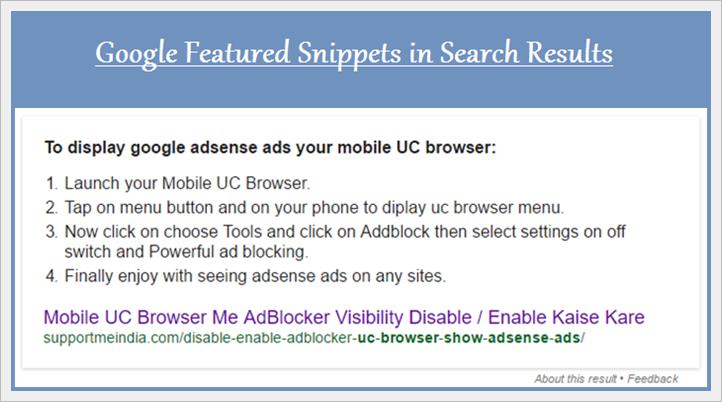
Google featured snippets special result ka look other pages se beatiful and user friendly hota hai. User ise baki post results se jyada pasand karte hai or isse aapko jyada search clicks milte hai. Actually, maine bahut bar google search me ayse page results dekhe the or mai sochta tha aane wale time me meri site ke pages bhi google same ayse hi show karega.
- Google Sitelinks Kya Hai Extra Sitelink Ko Kaise Remove Kare
- No Follow Vs Do Follow Link Dono Me Kya Difference Hai Basic SEO
Today, Mai google me kuch keywords search kar raha tha to maine featured snippets special results me apne blog ki post dekhi. I became very happy, becouse mera sapna pura ho chuka tha. Mujhe abhi blogging me ek year hua hai or ye mera google special search results promotion ka first experience tha. Now, mai aapko btane ja raha hu ki featured snippets in search kya hai or ye google me kaise show hota hai. Ise dikhane ke liye aapko kya karna hoga.
Google Search Results Featured Snippets Guidelines in Hindi
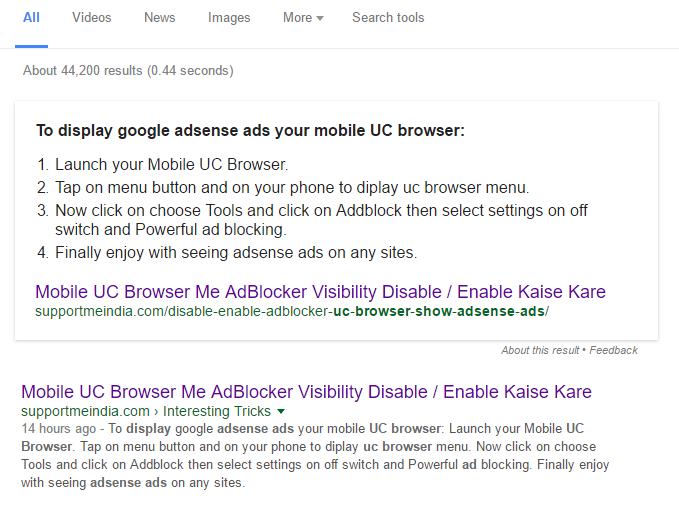
Google search me bahut se search queries ko directly search results me show karta hai. Inme se bahut se results me website page ke sath many features bhi show hote hai. Inhe rich answer, direct answer kaha jata hai. Inme se hi ek hai featured snippets special result jisme webpages ke sath extra summary bhi show hoti hai or iska look other pages se better hota hai. Examples, aap iska screenshot dekh sakte ho.
Summary Kaha Se or Kyo Show Ki Jati Hai?
Featured snippets result me jo summary show hoti hai wo webpages ke kisi bhi paragraph se li jati hai or user ko attract karne ke liye show ki jati hai. Jab visitor google me koi keyword search karta hai to isme un keywords se related summary show hoti hai. Jisse user us post par jyada like or click karte hai.
Opting Out of Featured Snippets: Is result ko search se remove kaise kare:
Agar aap apni website pages ko google me is type se show nahi karna chahate hai to aap ise search se remove bhi kar sakte hai. Iske liye aapko apni site me <head> ke bad <meta name=”googlebot” content=”nosnippet”> meta tag code add karna hoga.
Iske bad google aapki site ki koi bhi post ko featured snippets special result me show nahi karega.
Apni Site Ke Pages Ko Special Feature Me Kaise Dikhaye
You can’t, Aap google me manually featured snippets results show nahi kar sakte. Google programmatically determine karta hai ki kounsa page featured summary ke sath show karna hai. I mean google apne hisab se featured snippet result show karta hai.
But aap iske liye kuch step ko follow karke apne content ko featured snippets friendly bana sakte ho jisse aapki post ka promotion hone ki ummid badh jati hai.
How can I Mark My Pages in Featured Snippets:
- Write clear and fresh content.
- Don’t use extra words write only meaningful content.
- Provide a clear and direct answer to the question.
- Add value added info in articles.
- Make your content easy to read for readers.
- Identify a common and simple question.
To my way, mai aapko suggest karunga ki google me snippets results show karne ke liye aap fresh and clear content likhe. Featured snippets results se aapko googe se 40% more traffic milta hai. So ise ignore karna ek big organic traffic ko avoid karna hai.
- Google Webmaster Guidelines Kya Hai or SEO Ke Liye Kyu Jaruri Hai
- Google Adwords Kya Hai or Ye Kyo Jaruri Hota Hai Website Ke Liye
Some opinions of this article might be helpful. If yes then share this post on social media with your friends and other bloggers.


sir aapke table of content me kuch to gadbad hai. kuch special characters nazar aarahe hai.
sir mera sawal ye tha ke aapne rich snippet ke liye konsa plugin use kiya hai?
mere blog par rich snippet pehle work karta tha. but last month se search engines me ratings show nahi horahe hai. iske liye kya karna hoga?
fixed, star taring plugin.
bahut hi nice article aapne write kiya hai…and ye very useful bhi hai
sir rich snipets apne blog post me enable kaise karte hai ya ye khud he enable ho jata hai.
Apne aap bhi hota hai aur aap manually bhi kara sakte ho, iski guideline follow karke.
Bhai mene apke cloudflare wale post ko dekhkar clodflare pe account banaya th. Lekin kuch days se sham ke time mere website me error hone lagta hai. Aur server down ho jata hai. Mene free cloudfalre account use kiya tha. Lekin aaj jab mene apne website ko cloudflare se remove kar diya toh mere website ka server down nahi ho rah ahai. Lekin visitors kam ho gaye hai. Cloudflare ne mere website ki speed achi kar di thi lekin free version hone ki wajah se ye 100 mb tak traffic ko upload kar sakta hai. Ab mujhe kya karna chahye. Kya mujhe VPS hosting use karna chahye. Mujhe apki help chahye. Mene apko whatsapp bhi kiya hai, but sayad aap whatsappp pe nahi atye hai.
Vikash mai aapko suggest karunga ki aap VPS plan use kare.
Agar VPS hosting use karunga toh kya mujhe cloudflare ki jarurat bhi paregi, wais maine MAXcdn use kiya hai.
Aap chaho to use kar sakte ho.
Nice Post bro .. bhot acha likha hai me bhi ye sab apne blog me apply kruga 🙂
Amazing post @Jumedeen.. Well written.. Thanx for sharing this. Aapka ye post personally mujhe padh kar bahut achha laga.. Ye bahut achhi baat hai ki aap apne new experiences ko bhi apne blog post ke jariye hum sab se share karte hai. Aur isse hum sab kaafi motivate hote hai.. Again Thanx
Welcome ahmad, aane wale time me bhi humare blog par visit kare.
Thanks bade bhai mujhe featured snippets ki jankari chaiye thi kyuki maine bahut si websites ko isihi trah search par show hote dekha hai isse site ke pageviews aur quality dono increase hoti hain.
sir app ye btye jo apne post likhi hai phele AdSense wali jisme apne aye btya hai ki AdSense ko load kaise kre usme ke niche ek script btyi gyi hai
ads ko fast load krne ke liye to kya mai ise use kru ?? kya apne use use kiya ya phir kisi or site pr dekha use krte hue?? kya use lgna shi hoga ?? koi risk to nhi hogi?? plz ans dijiyega
Mai iske liye suggest nahi karta. Aap apni risk par use kar sakte ho.
sir aap ye batye ki WordPress par images ka backup kese lete hai
cpanel se bhi btaye
aap dashboard par ja kar tools >> export par click kar media par click karke download kar sakte ho.
par sir me to hamesha all content pr se back lete hu vo sirf 12 -15 mb ka hota hai but usme images nhi hoti sirf post , tags ,etc hote hai
Ye ek simple backup hai jisme sabkuch nahi hota. Full backup lene ke liye aap apne hosting cpanel par jao or backup par click karke jis file ka backup lena hai wo select karo.
bhai aapko 1 saal ho gaye AdSense ke sath toh kya aajtak aapko AdSense ke taraf se warning mili hai ?
Nahi
congratulation bhai, bahot hi badhiya jaankari share ki aapne humesha ki tarah, Thank you so much bhai
jumedeen ji mene aapki mail kiya hai please uska reply kar dijiye.
Ok mai mail check karke aapko reply kar dunga.
Hlw sir mene Godaddy se domain liya hai or blogger se Add bhi kar diya hai. ab aap ye btaye ki Domain ke setting me jaker Forwarding ka jo option aata hai. use off he rhene du ya phir usme apna domain Add kar du?
Pls detail me btayeki ye kya hai… or me kya karu?
Is option ko off hi rahne do ye tab kaam aata hai jab aap apne domain ko kisi or site par forward karna chahate ho.
Sir maine April month me ek Blog banaya tha. (www.hindimeguide.blogspot.com) . May me Google Adsance se kuchh Paisa bhi mila. lekin uske baad koi paisa nahin aa raha hai. kya kaaran ho sakta hai ? blog dekhkar seriously advise kijiye.
Payment ka blog se koi lena dena nahi hai aap AdSense par check karo aapki current earning kitni hai or last time AdSense ne aapko kitna payment send kiya hai.
Bro first of all congratulations for new VPS hosting and Genesis Theme.
Apka blog ab, pehle se kafi accha lag raha hai.
Mera apse ek sawal hai?
Uc browser me ads show nahi hote, woh me janta hun, lakin jab bhi me apna blog uc browser me kholta hun ads ke jagah par blank space aa jata hai. isi karan mere bounce rate increase ho raha hai kyon ki user ko aisa lagta ha content hai hi nahi.
lakin apke blog me bhi kaie sare ads hai…lakin UC browser me blank space nahi aa rahe hai.
kripya karke mujhe bhi iska solution bataye.
mene apne blog apke bataye tarike se add dala hai :- https://www.supportmeindia.com/show-adsense-ad-width-full-size-responsive/
Aap responsive size ka ads use karo. rsponsive adblocker hone par space show nahi karta.
main bhi kaafi time se bogging kr raha hoon. lekin abhi tak result milne start nahi hue. net per jo bhi kuch padta hoon usi ke anusaar sikha hai. ab kahi jaa kr traffic 3000+ hua hai kabhi 3500+ bhi ho jata hai. Maine high CPC keyword bhi use kiye but not kiya ki mere blog pr advertisement pet hi aati hain aur unka cpc .01 $ se .10$ tak hota hai day end tak wo .03$ aa jata hai itne page view ke baad bhi income 1.51$ yaa 1.78$ hoti hai. Mera treffic mostly search engine se aata hai. Blog hindi main hai US ke bhi idea 300+ visitors hai but wahan se click kabhi nahi milta.
kya aap mujhe bata sakte hai ki main kya karun? daily Click 40+ hote hain aur idea 10$ daily ka abhi target hain. kya kahi koi kami hai yaa target country change karu yaa nich(Health) ko change karu i m totally confused?
pls help
Health related AdSense ads ki CPC low hi hoti hai. Aap ek bar low cpc ads ko block karke kuch day result check karo i hope aapko jyada benefits milega.
sir ji wo bhi kr chuka phir bhi cpc increase nahi ho rahi. 10-15 din lagataar ad block ki uske baad 1 week wait bhi kiya but no result. Pls see my site and give me some suggestion.
aur haan aaj aap ki post pr ker maine bhi ek post bana ker daali hai dekhte hain kaisa result milta hai. festival gift ke uper.
mai keyword ke liye google adword use kr raha hoon kya usse bhi accha koi option hai. aur USA ke traffic ke liye kya karen?
Ho sakta hai aapne old low cpc url block kiye ho koi or latest url block karo second aap topic change karke other keywords par post likho.