
Maine apni pichli post Blog Me Email Subscribe Widget Kaise Add Kare me btaya tha ki blog me email subscribe widget kaise add kare. Now, Is article me mai aapko blog me Pop up Email Subscribe Box add karne ke bare me bta raha hu. Jise CSS coding and jquery ki help se banaya gaya hai.
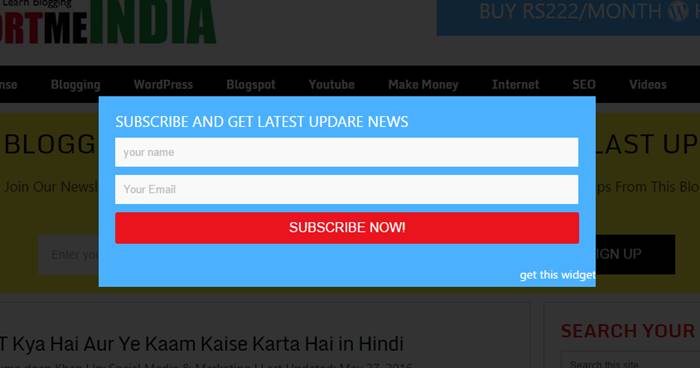
Is popuup subscribe box ko aap apne WordPress, blogspot and other sabhi blog or all website par use kar sate ho or apne email marketing business ko increase kar sakte ho. Ye pop up email subscribe box sabhi sites par work karega.
Sabse achi bat ye hai ki ye fast loading or feedburner email subscription support hai. Yani ki aap isme google ki free service feedburner use akr sakte hai. Really, apne blog par email subscribers badhane ka ye ek acha tarika hai.
Blog Me Pop up Email Subscribe Box Kaise Add Kare Widget Code
Yaha mai aapko jo code bta raha hu wo sabhi blog or website me kaam karega. Bas iske liye aapko apne blog me kahi par bhi widget me is code ko paste karna hai. But agar kisi wajah se wok na kare to aap <style> to </style> code ko blog me </style> se pahle paste kare.
Option 1:
Sabse pahle aap ye code copy kare or isme apni feedburner email subscribe ID change kare.
<style>
#sub-box {
display : none;
background : rgba(0, 0, 0, 0.8);
width : 100%;
height : 100%;
position : fixed;
top : 0;
left : 0;
z-index : 99999;
}
#boxclose {
width : 100%;
height : 100%;
}
#boxview {
background : #fff;
width : 600px;
height : 230px;
position : absolute;
top : 35%;
left: 27%;
}
#boxlink a.visited, #boxlink a, #boxlink a:hover {
color : #aaaaaa;
font-size : 9px;
text-decoration : none;
text-align : center;
padding : 5px;
}
#subscribe-box {
width : 600px;
height : 230px;
background-color : #4bb1ff;
}
#subscribe-box p {
font-family:'Open Sans'
;font-size:18px;
color:#fff;
line-height:20px;
padding:20px 20px 0 20px;margin:0;
}
#subscribe-box .emailfield {
padding:0px 20px 10px;}
#subscribe-box .emailfield input {
background:#f9f9f9;
color:#bbb;
padding:10px;
margin-top:10px;
font-size:13px;
font-family:'Open Sans';width:96.3%;
border:0;transition:all 0.4s ease-in-out;
}
#subscribe-box .emailfield input:focus {
background:#fff;outline:none;
color:#888;
}
#subscribe-box .emailfield .submitbutton {
background : #ea141f;
color : #fff;
text-transform : uppercase;
font-weight : normal;
font-size : 16px;
border : none;
outline : none;
width : 100%;
cursor : pointer;
border-radius : 3px;
transition : all 0.4s ease-in-out;
}
.i {
margin-top: 15px; float: right;
}
#subscribe-box .emailfield .submitbutton:active {
outline : none;
border : none;
background : #fff;
color : #ea141f;
}
#subscribe-box .emailfield .submitbutton:hover {
background : #18c90c;
color : #fff;
}
</style>
<script type='text/javascript'>
//<![CDATA[
jQuery.cookie = function (key, value, options) {
// Pengaturan cookie
if (arguments.length > 1 && String(value) !== "[object Object]") {
options = jQuery.extend({}, options);
if (value === null || value === undefined) {
options.expires = -1;
}
if (typeof options.expires === 'number') {
var days = options.expires, t = options.expires = new Date();
t.setDate(t.getDate() + days);
}
value = String(value);
return (document.cookie = [
encodeURIComponent(key), '=',
options.raw ? value : encodeURIComponent(value),
options.expires ? '; expires=' + options.expires.toUTCString() : '', // use expires attribute, max-age is not supported by IE
options.path ? '; path=' + options.path : '',
options.domain ? '; domain=' + options.domain : '',
options.secure ? '; secure' : ''
].join(''));
}
// cookie
options = value || {};
var result, decode = options.raw ? function (s) { return s; } : decodeURIComponent;
return (result = new RegExp('(?:^|; )' + encodeURIComponent(key) + '=([^;]*)').exec(document.cookie)) ? decode(result[1]) : null;
};
//]]>
</script>
<script type='text/javascript'>
jQuery(document).ready(function($){
if($.cookie('popup_facebook_box') != 'yes'){
$('#sub-box').delay(3000).fadeIn('fast');
$('#closebox, #boxclose').click(function(){
$('#sub-box').stop().fadeOut('fast');
});
}
});
</script>
<div id='sub-box'>
<div id='boxclose'>
</div>
<div id='boxview'>
<div id='closebox'>
</div>
<div id='subscribe-box'>
<center><p>SUBSCRIBE AND GET LATEST UPDATE NEWS</p></center>
<div class='emailfield'>
<form action='https://feedburner.google.com/fb/a/mailverify?uri=supportmeindia' method='post' onsubmit='window.open('https://feedburner.google.com/fb/a/mailverify?uri=supportmeindia, 'popupwindow', 'scrollbars=yes,width=550,height=520');return true' target='popupwindow'>
<input type='text' name='name' onblur='if (this.value == "") {this.value = "Your Name";}' onfocus='if (this.value == "Your Name") {this.value = "";}' value='your name'/>
<input type='text' name='email' onblur='if (this.value == "") {this.value = "Your Email";}' onfocus='if (this.value == "Your Email") {this.value = "";}' value='Your Email'/>
<input name='uri' type='hidden' value='YOUR-USER-NAME'/>
<input name='loc' type='hidden' value='en_US'/>
<input class='submitbutton' type='submit' value='Subscribe Now!'/>
</form>
Option 2:
Ab aapko ye code apne blog me add karna hai. Mai yaha aapko blogspot or WordPress dono ke step bta raha hu.
- WordPress: Go to WordPress dashboard >> appearance >>widgets >> select widget >> add widget and paste above code.
- Blogspot: Go to blogger dashboard >> layout >> add a gadget >> HTML/Javascript and paste this code.
Agar blogger me direct widget add karne se pop up subscribe box work na kare to aap ye step follow kare.
Step 1:
- Blogger dashboard par jaye or drop down menu me template option par click kare.
- Ab edit html par click arke Ctrl+F key button dabaye or </style> code search kare.
- Ab </style> code se pahle (above) ye code copy karke paste kare.
- Now, Save template par click kare.
#sub-box {
display : none;
background : rgba(0, 0, 0, 0.8);
width : 100%;
height : 100%;
position : fixed;
top : 0;
left : 0;
z-index : 99999;
}
#boxclose {
width : 100%;
height : 100%;
}
#boxview {
background : #fff;
width : 600px;
height : 230px;
position : absolute;
top : 35%;
left: 27%;
}
#boxlink a.visited, #boxlink a, #boxlink a:hover {
color : #aaaaaa;
font-size : 9px;
text-decoration : none;
text-align : center;
padding : 5px;
}
#subscribe-box {
width : 600px;
height : 230px;
background-color : #4bb1ff;
}
#subscribe-box p {
font-family:'Open Sans'
;font-size:18px;
color:#fff;
line-height:20px;
padding:20px 20px 0 20px;margin:0;
}
#subscribe-box .emailfield {
padding:0px 20px 10px;}
#subscribe-box .emailfield input {
background:#f9f9f9;
color:#bbb;
padding:10px;
margin-top:10px;
font-size:13px;
font-family:'Open Sans';width:96.3%;
border:0;transition:all 0.4s ease-in-out;
}
#subscribe-box .emailfield input:focus {
background:#fff;outline:none;
color:#888;
}
#subscribe-box .emailfield .submitbutton {
background : #ea141f;
color : #fff;
text-transform : uppercase;
font-weight : normal;
font-size : 16px;
border : none;
outline : none;
width : 100%;
cursor : pointer;
border-radius : 3px;
transition : all 0.4s ease-in-out;
}
.i {
margin-top: 15px; float: right;
}
#subscribe-box .emailfield .submitbutton:active {
outline : none;
border : none;
background : #fff;
color : #ea141f;
}
#subscribe-box .emailfield .submitbutton:hover {
background : #18c90c;
color : #fff;
}
Step 2:
- Ab blogger layout me jaye or
- Add a gadget par click kare
- HTML/Javascript select kar ke ye code paste kare.
- Finally, Save management par click are.
<script type='text/javascript'>
//<![CDATA[
jQuery.cookie = function (key, value, options) {
// Pengaturan cookie
if (arguments.length > 1 && String(value) !== "[object Object]") {
options = jQuery.extend({}, options);
if (value === null || value === undefined) {
options.expires = -1;
}
if (typeof options.expires === 'number') {
var days = options.expires, t = options.expires = new Date();
t.setDate(t.getDate() + days);
}
value = String(value);
return (document.cookie = [
encodeURIComponent(key), '=',
options.raw ? value : encodeURIComponent(value),
options.expires ? '; expires=' + options.expires.toUTCString() : '', // use expires attribute, max-age is not supported by IE
options.path ? '; path=' + options.path : '',
options.domain ? '; domain=' + options.domain : '',
options.secure ? '; secure' : ''
].join(''));
}
// cookie
options = value || {};
var result, decode = options.raw ? function (s) { return s; } : decodeURIComponent;
return (result = new RegExp('(?:^|; )' + encodeURIComponent(key) + '=([^;]*)').exec(document.cookie)) ? decode(result[1]) : null;
};
//]]>
</script>
<script type='text/javascript'>
jQuery(document).ready(function($){
if($.cookie('popup_facebook_box') != 'yes'){
$('#sub-box').delay(3000).fadeIn('fast');
$('#closebox, #boxclose').click(function(){
$('#sub-box').stop().fadeOut('fast');
});
}
});
</script>
<div id='sub-box'>
<div id='boxclose'>
</div>
<div id='boxview'>
<div id='closebox'>
</div>
<div id='subscribe-box'>
<center><p>SUBSCRIBE AND GET LATEST UPDARE NEWS</p></center>
<div class='emailfield'>
<form action='https://feedburner.google.com/fb/a/mailverify?uri=supportmeindia' method='post' onsubmit='window.open('https://feedburner.google.com/fb/a/mailverify?uri=supportmeindia, 'popupwindow', 'scrollbars=yes,width=550,height=520');return true' target='popupwindow'>
<input type='text' name='name' onblur='if (this.value == "") {this.value = "Your Name";}' onfocus='if (this.value == "Your Name") {this.value = "";}' value='your name'/>
<input type='text' name='email' onblur='if (this.value == "") {this.value = "Your Email";}' onfocus='if (this.value == "Your Email") {this.value = "";}' value='Your Email'/>
<input name='uri' type='hidden' value='YOUR-USER-NAME'/>
<input name='loc' type='hidden' value='en_US'/>
<input class='submitbutton' type='submit' value='Subscribe Now!'/>
</form>
</div><a href=" https://www.supportmeindia.com/add-popup-email-subscribe-box-on-your-blog/" target="blank" class="i">get this widget</a></div></div></div>
Note: Supportmeindia ki jagah apni email ID replace kar le.
Bas ab sab setting ho chuki hai. Ab aap apni site ko pen karke dekh sakte hai ki pop up subscribe box kaam kar raha hai ya nahi. Agar aapko koi problem aaye to comment section me uske bare me bta sakte ho.
- Feedburner Par Email Subscriptions Service Kaise Activate Kare
- Apne Blog Ke Liye Feedburner Par Account Kaise Banaye
I hope ye trick aapke bahut kaam aayegi or aapke blog ke email subscribers increase honge. So plz is post ko social media par share jarur kare.







Achchi jankari di hai aapne
WordPress Post ke last ending me subscribe box kaise add kare ?
Plugin use karo ya direct functions.php me after content widget code add karo.
me kaise karu ki blog me blog post me nahi blog me photo par click kare aur mere app ka link open ho jaaye pls tell me bahut search kiya hai pr mila nahi answer
Post ki html coding me ja kar img ki coding me apne app ka link add karo.
jab mera blog koi open karta hai to ye likha ataa hai khan saab kya kare
Deceptive site ahead
Attackers on skoriginalhub.blogspot may trick you into doing something dangerous like installing software or revealing your personal information (for example, passwords, phone numbers or credit cards).
Aapki site par malware attacks hua hai. Iski jankari ke liye aap ye post padho “wpbeginner.com/wp-tutorials/how-to-fix-this-site-ahead-contains-harmful-programs-error-in-wordpress”
bhai,Blogspot mein,jaise Top per -Home,contact us kaise show hota hai
Navigation bar add karna hota hai. Ye feature template me already hota hai.
Hello sir,
Mai apne blog me pop window me ak png file ka photo add karna chahta hun aur sath hi sath usme kuchh text aur link bhi add karna chahta hu.
Asa maine kar bhi diya tha but problem ye aa rahi hai ki mere koi bhi post ko kholne par bar bar wo pop up window aa jati hai mai chahta hun ki sirf 1st visit par hi wo notification aaye..
Plz help me sir..
Agar koi code hai to de dijiye ..
Mai blogger par hun..
Rahul mai aapko coding ke bare me jyada kuch nahi bta sakta. I’m sorry aap kisi or se is bare me help le sakte hai.
Thanks brother important jankari ke lai
Other question
Meri site ka footer me copyright aage meri site ka name par click kre par template company ka site khultee h
Kyo ki html me template company ka link dala huaa
Ese link ko hatane par meri site nhi kholegi balki template company ki site khulegi
Ye problem kese solve hogi
Aap aysi template hi use mat karo jisme redirection code ho. Or bahut template hai wo use karo.
bahi jab mai feedburner me subscribe box add karta hu tab ye msg aata hai
The URL does not appear to reference a valid XML file. We encountered the following problem: Error on line 1: XML document structures must start and end within the same entity.
Aap url galat use kar rahe ho. Aap feedburner ka saghi link use karo.
bahi aaj karib 3 baje mera blog islamisthebest.co.in se open hota tha
but ab The domain islamisthebest.co.in is no longer parked by GoDaddy.
ye msg aata hai kya blog delet ho gya
Abhi aapka blog sahi se open ho raha hai.
popup subscribe box mobile me aadha hi dikh raha hai ise responsive kaise banaye .
CSS coding edit karke. Usme aap px ki jagah present me width or height select karo.
bro ye jo har post ke niche recommanded post for you likha ata hai ye koi plugin h kya agar h to konsa hai???
Nahi ye koi plugin nahi hai. Ye theme ka hi feature hai.
Bro kiya hum featured image ke liye koi plugin use kr skte h kya
Ha kar sakte ho google me features image plugin likh kar search kar lo.
bro kidhar jake editing karni hogi
Iske liye aapko theme ki puri hi coding change karni hogi.
mujhe yeh bataye ki Mujhe WordPress me Nofollow plugin add karni hai .
toh mujhe esi plugin ke baare me bataye Jo Blog ki link ko Dofollow aor Other dusri site ki Link ( outbound link ) ko Nofollow set kar de
Ye plugin use karo http://WordPress.org/plugins/nofollow-for-external-link/
bro aap jaisi Featured image kaise set kare apni home page mai aur comments side mai likha aye jaise apki mai ata hai
Iske liye aapko theme me coding editing karni hogi. Maine is theme ko lagbhag puri tarah change kar diya hai.
Bro hum AdSense ke ads par din me kitne click kar sakte hain
Din me nahi kabhi bhi ek bhi click nahi kar sakte warna AdSense aapko block kar dega.
Jumedeen mujhe bloging me 8 saal ho gye hain. Lekin aaj bhi me aapse seekhta hun. Aapne bahut kam time me bahut acha work kiya hai.
Scecialy thanks for the support all visitors.
Aap meri site info tech hindi ko bhi visit kren or unme jo kamiyan nazar aaye mujhe bhi aagah kren.
Aapka bhai Aamir
What is this bro mai is par yakin nahi kar sakta. But agar ye sach hai to aapko ab change hone ki jarurat hai. Aapke blog me koi kami nahi hai. Bas smart bano or aane wale time par focus karke blogging karo. I hope is trick se aap wo kar paoge to 8 sal me nahi kar paye.
sir mai aap se sikh ker aapke post padhker mai aapko bahut bada thankYou
kahna chhahuga mai bhi ek blog bnaya hu techdiscovers.blogspot.com sir usme aap dekh ke btaye ke kya kami hai.
Aap apne blog ki template change karo or blog ko ache se design karo. achi widget add karo.
Sir क्या हमे ऐसा ही ईमेल सब्सक्राइब बॉक्स वर्डप्रेस में प्लगइन के द्वारा लगा सकते हैं?
Ha laga sakte ho WordPress par ayse hazaro plugin hai jo ek se badh kar ek subscribe box offer karte hai.
Jumedeen Khan ji mera AdSense account hosted hai maine aapne jaise kaha vaise site manegment jakar ad bhi lagaya lekin 1 hafte bad wo ad automatic delet ho gaya. kya aap meri website dekhakar pata sakate hai kya problem ho sakta hai. mere sabhi post orginal hai or maine google AdSense pin verification bhi kiya hai.
Kiran aap pin verify tabhi kar sakte ho jab aapke AdSense account me $10 ho or aap fir se ads bana kar blog par laga sakte ho. Agar aapki site par traffic nahi hoga to ads show bhi nahi honge.
Bhai jese apne add kia hua hai go to p click krke visitor apna man pasand topic choose kar skte hai… Ese m apne WordPress p kese add karu?? Plz btaiye
Aap aysi theme use karo jo mobile responsive ho or isme aysa menu bar ho.