Blog ke liye subscribers kitne jaruri hote hai ye bat sabhi jante hai. Kyuki aapke new post publish karne ke bad un sabhi ko iski notification milti hai or unme se minimum 20% to jarur aapki post padhne ke liye site par aate hai. Agar aap blog par subscription text ko change kar le to users ko jyada attract kar sakte ho.
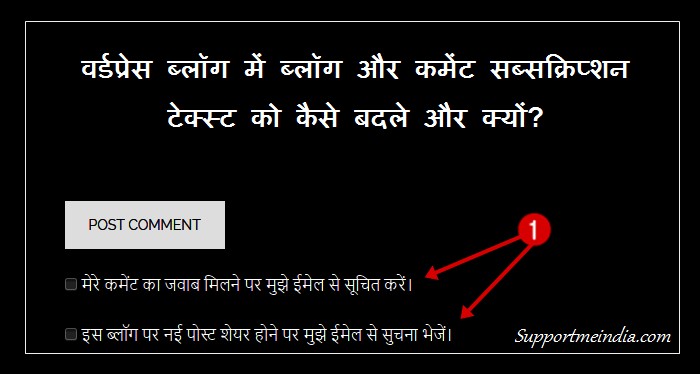
WordPress blog me hum post me comment box ke niche jetpack plugin ki subscription service se “follow comments” or “follow blog” ke option add karte hai. Isse visitors huamre blog or comment feed ko direct subscribe karte hai.
Isme “Notify me of follow-up comments by email.” and “Notify me of new posts by email.” subsription text add hota hai jo ki english language me hota hai isiliye all hindi readers ko attract nahi kar pata.
- Feedburner Ka Email Delivery Time Kaise Change Kare
- Blogger Se Subscribe to Post Comments (Atom) Ko Remove Kaise Kare
Agar aap hindi blogger hai to main iske liye aapko personally suggest karunga. Aap is trick ko ek bar try jarur kare yakinn aapko isse fayda hoga or pahle se jyada log aapke blog ko subscriber karenge.
Actually, hindi blog par blog and comment subscription jyda effactive nahi hota hai kyuki bahut se users english words ko bina read kiye avoid kar dete hai. So hum ise change kar sakte hai, isse jyada subscribers milne ke chance badh jate hai. Aap subscriber text ko apne blog ki language me change kare to jyada behtar hoga.
How to Change Jetpack Comment Subscription Text in Hindi
Subscriptions text ko edit karne ke lyie aapko jetpack ke subsriptions.php folder ko open karna hoga. Iske aapke pas 2 tarike hai ek aap cpanel par ja kar kar sakte ho or second apne blog ke dashboard me ja akr bhi kar sakte ho. Main dono tariko ke bare me bta raha hu.
1. Change Subscription Text via Cpanel:
- Sabse pahle aap apne blog ke cPanel me ja oar log in kare or public_html par click karke wp-content folder open kare.
- Ab plugins option par select karke jetpack plugin select kare.
- Yaha par aapko subscriptions.php name ka ek folder dikhayi dega.
- Is par right click kare or edit par click kar ke ctrl+f key button daba kar “Notify me of follow-up comments by email.” and “Notify me of new posts by email.” dono text bari bari search karke change kar le.
2. Change Subscription via WordPress Dashboard:
- Sabse pahle aap WordPress blog ka dashboard open kare.
- Ab left side sidebar me plugins >> editor option choose kare.
- ap right side top par select plugin t oedit ke samne jetpack by WordPress.com choose kare.
- Select par click kare.
- Ab ctrl+f button prase kar ke right side me sabhi links me se subscriptipns.php folder search kare.
- Folder open karke notify me wale subscription text search karke unhe apne blog ki language me change kar le.
- finally, settings save akr le.
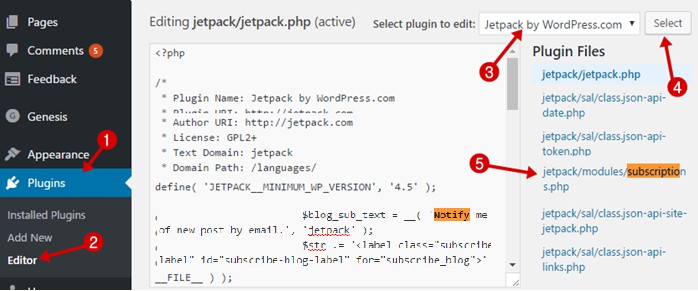
In dono option se aapko subscriptions.php folder me ye do code milenge jinmse se aap subscription text words ko edit kar change kar sakte hai.
$comment_sub_text = __( 'Notify me of follow-up comments by email.', 'jetpack' );
Line 630: $blog_sub_text = __( 'Notify me of new posts by email.', 'jetpack' );
Is tarah se aap apne WordPress blog me jetpack ki subscription service ke text badal sakte ho. I’m sure isse aapko hundred percent benefits milega or aapke blog ko jyada se jyada users subscriber karenge. Iske alawa aap sidebar or footer widget me bhi jetpack subscribe box add kar sakte ho.
Email marketing blogging me most important hai or agar aap email marketing istemal nahi karte ho to aap sabse badi galti kar rahe ho. Kyuki 10,000 visitors (jo aapki site ko bahut pasand karte hai.) se 1,000 email subscribers jyada importance rakhte hai.
Kyuki aapke readers ko aapki new post ki suchna milegi nahi jabki aapke subscribers ko aapke post publish karne ke bad notification milegi or unme se sabhi nahi to 20% t0 50% aapki site par content padhne jarur aayenge.
- Blog Me Pop up Email Subscribe Box Kaise Add Kare in Hindi
- Feedburner Par Email Subscriptions Service Kaise Activate Kare
So email marketing ko avoid na kare or apne blog par feedburner service ya koi other services jarur use kare. Agar aap pay kar sakte ho to main aapko suggest karunga ki aap awebar, mailchip jaisi paid services istemal kare.
I hope aapko is article me helpful jankari mili hogi. Agar ha to apna 5 second ka time de kar ise other blogger ke sath social media par share jarur kare.